[Case 04]

Specialized iWatch Application To Assist Farmers

Agricluture
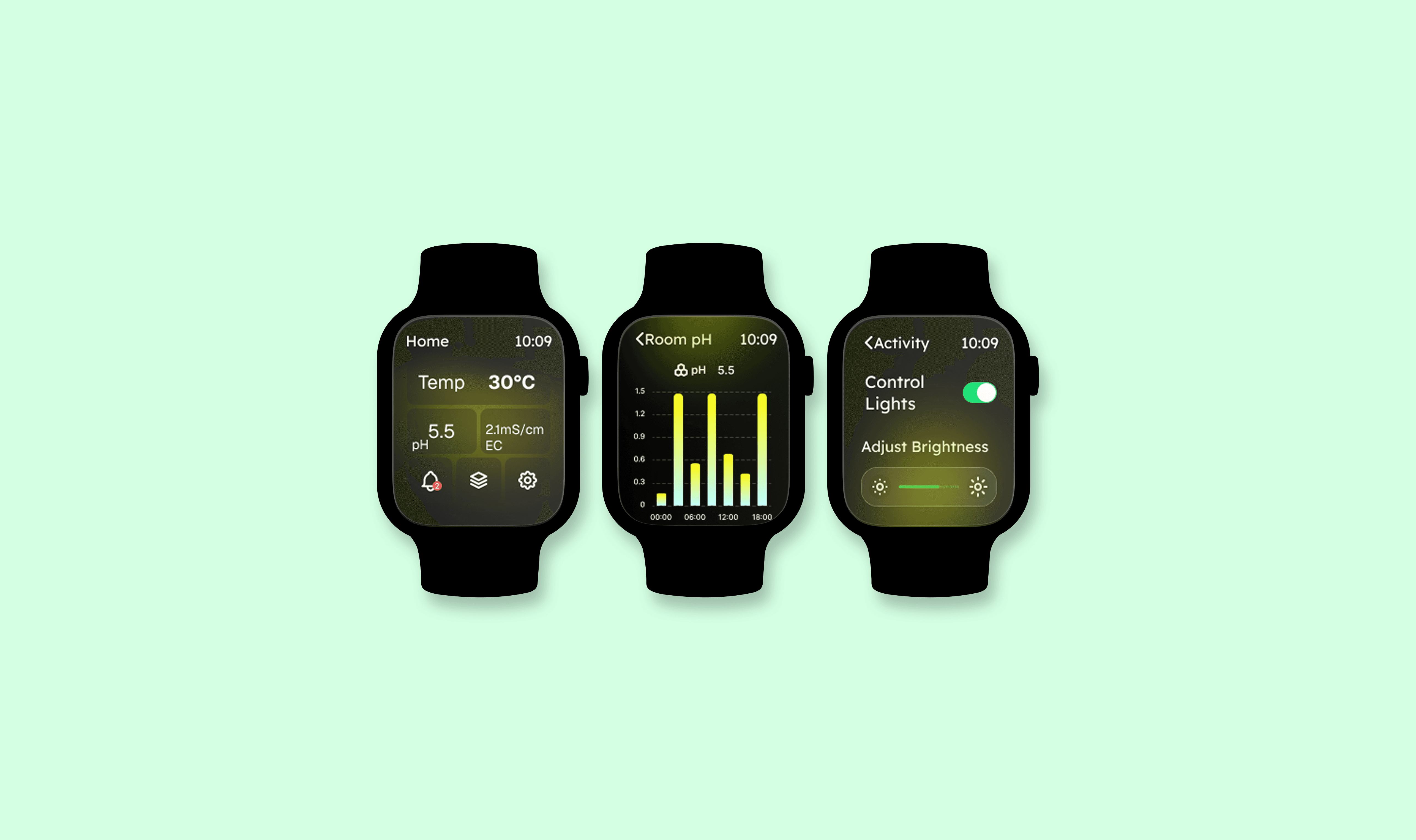
Hydrogrow An iWatch App

iWatch Application designed to assist hydroponic farmers.

[Project Overview]

Designed a specialised Apple Watch application to assist hydroponic farmers with real-time monitoring and task management.

The app delivers a minimalist yet data-rich experience optimised for the small screen, enabling quick glances and efficient control over critical farming parameters.

[Problem Statement]

[Industry]

Agricluture

[My Role]

UX/UI Designer

[Platforms]

iWatch

[Timeline]

March 2025 - March 2025

[Persona]

Age: 24

Location: Hyderabad

Tech Proficiency: pofiecient

Gender: Female

Sana Iqbal

The Student Researcher M.Sc. Botany Student

While working in the lab, I’m constantly moving. It’s easier to look at my watch to see the current temp and pH than check the phone every time I take a reading.

[Process]

[01] User Research

Conducted user interviews accross the india with 40 participants to understand their needs, goals and pain points.

Analyzed user behavior data to pinpoint where users dropped off in the process.

[01] User Research

Conducted user interviews accross the india with 40 participants to understand their needs, goals and pain points.

Analyzed user behavior data to pinpoint where users dropped off in the process.

[01] User Research

Conducted user interviews accross the india with 40 participants to understand their needs, goals and pain points.

Analyzed user behavior data to pinpoint where users dropped off in the process.

[02] Insights

Users were frustrated by not having any handy solution for the monitoring plant's health.

Busy users gets frustrated by carrying heavy machines like laptops.

If there was a solution then users were frustrated by complex UI designs.

[02] Insights

Users were frustrated by not having any handy solution for the monitoring plant's health.

Busy users gets frustrated by carrying heavy machines like laptops.

If there was a solution then users were frustrated by complex UI designs.

[02] Insights

Users were frustrated by not having any handy solution for the monitoring plant's health.

Busy users gets frustrated by carrying heavy machines like laptops.

If there was a solution then users were frustrated by complex UI designs.

[04] Testing & Iteration

Conducted A/B testing with 10 users.

Gathered feedback through usability testing.

Designed an iWatch layout according to user's feedback.

[04] Testing & Iteration

Conducted A/B testing with 10 users.

Gathered feedback through usability testing.

Designed an iWatch layout according to user's feedback.

[04] Testing & Iteration

Conducted A/B testing with 10 users.

Gathered feedback through usability testing.

Designed an iWatch layout according to user's feedback.

[Outcome]

Users can see every data at a glance now.

Users can see every data at a glance now.

Users gets all alrets and notifications on their wrists.

Users gets all alrets and notifications on their wrists.

Users can control sensors like water sensors, humidity etc. from their wrist.

Users can control sensors like water sensors, humidity etc. from their wrist.

[Key Learnings]

UX is not limited to the mobiles and website only.

In this era of tech users are not dependant only on mobiles or laptops.

UX is not limited to the mobiles and website only.

In this era of tech users are not dependant only on mobiles or laptops.

UX is not limited to the mobiles and website only.

In this era of tech users are not dependant only on mobiles or laptops.

Users value easy, small and quick actions.

Making it eacy to handle, see through is very helpful.

Users value easy, small and quick actions.

Making it eacy to handle, see through is very helpful.

Users value easy, small and quick actions.

Making it eacy to handle, see through is very helpful.

Select this text to see the highlight effect